
Access control and attendance. Talks to your existing readers directly — swipes, people and cards, attendance — and exports in the 701SQL format for existing attendance software.
- 01WHO IT IS FOR
- 02SYSTEM ARCHITECTURE
- 03PRODUCT SCREENS
- 04CORE FEATURES
- 05MODULES
- 06SWITCHING FROM 701
- 07FAQ
- 08Contact
SynAccess — Access Control & Attendance
Access Control · Attendance · On-premise
SynAccess has its own product site with screens, modules and rollout details.
Visit synaccess.shengyiltd.comEverything on this page — who it fits, architecture, modules, switching from 701 and FAQ — as one PDF, with our contact details.
Web-based access control and attendance that works with the readers you already have. Collect swipes, manage people and cards, run shifts and attendance, then export in the 701SQL format for the attendance software you already use — the existing process stays as it is.
- Sites still running 701SQL
You want a web console several people can use at once, without replacing the attendance software downstream. Exports follow 701Client’s time-clock conversion settings, so that software keeps reading the same file.
- Multi-floor, multi-door offices and plants
Access is split by department, door group and time zone; a manager’s account can be limited to their own department and chosen readers, enforced on the server.
- Residential communities and buildings
- Residents
- Security
- Facilities
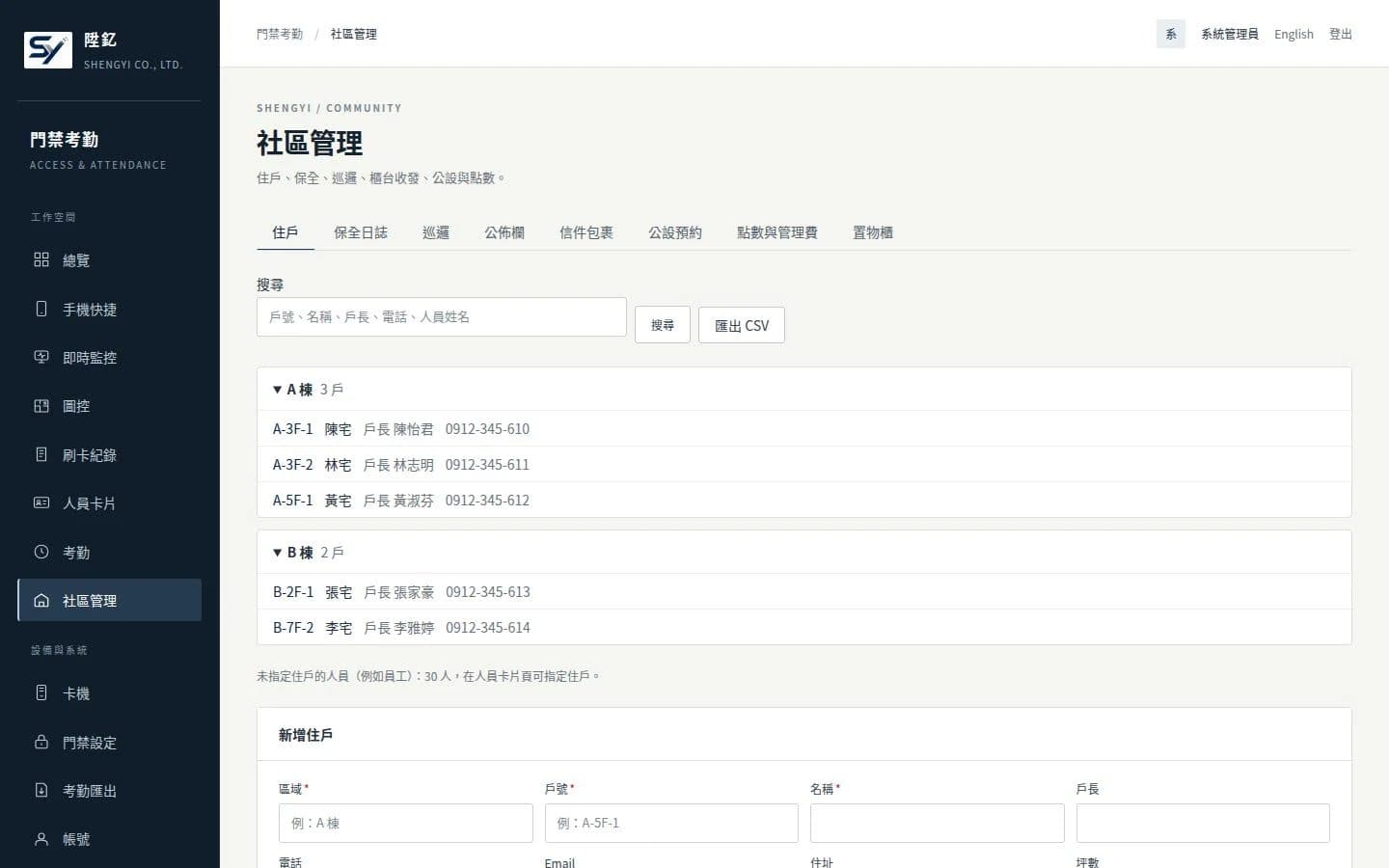
Residents, security logs and shift handover, patrols, parcels, facility booking with points, management fees and lockers — all on the same resident and card records as access control.
- SMBs that want attendance to flow into payroll
Shifts, daily and monthly reports, leave and corrections live in one system; the monthly report can calculate pay and employee labour/health insurance contributions and export to Excel.
The reader verified in practice so far is the SOYAL AR-837 over TCP, plus floor permissions on elevator controllers. For other brands and models we check the protocol first and say plainly if it does not fit.
A background service keeps talking to the readers; the web console and that service only share the database, so restarting the web side never stops swipes being collected. Settings changed in the browser reach the readers within five seconds.
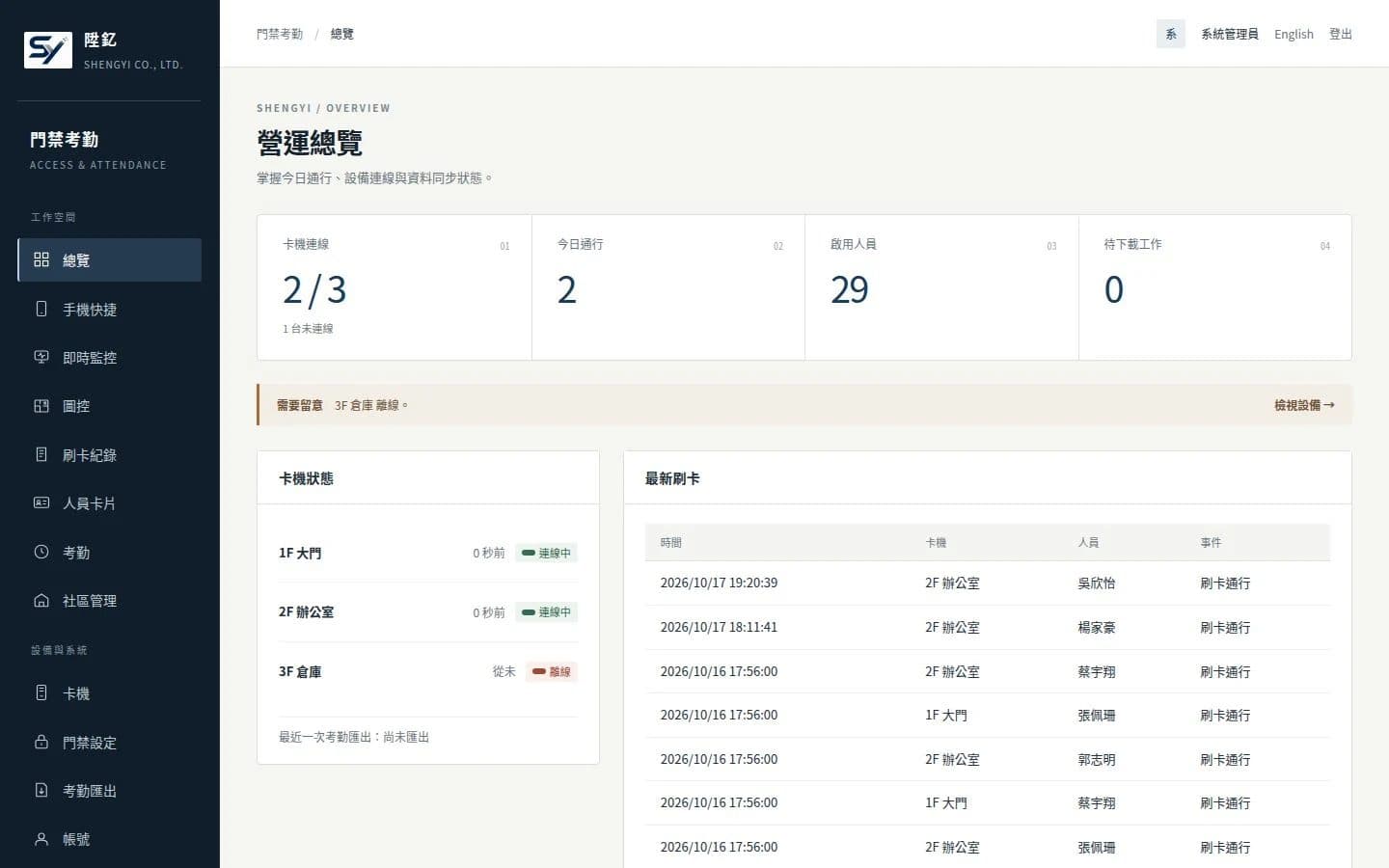
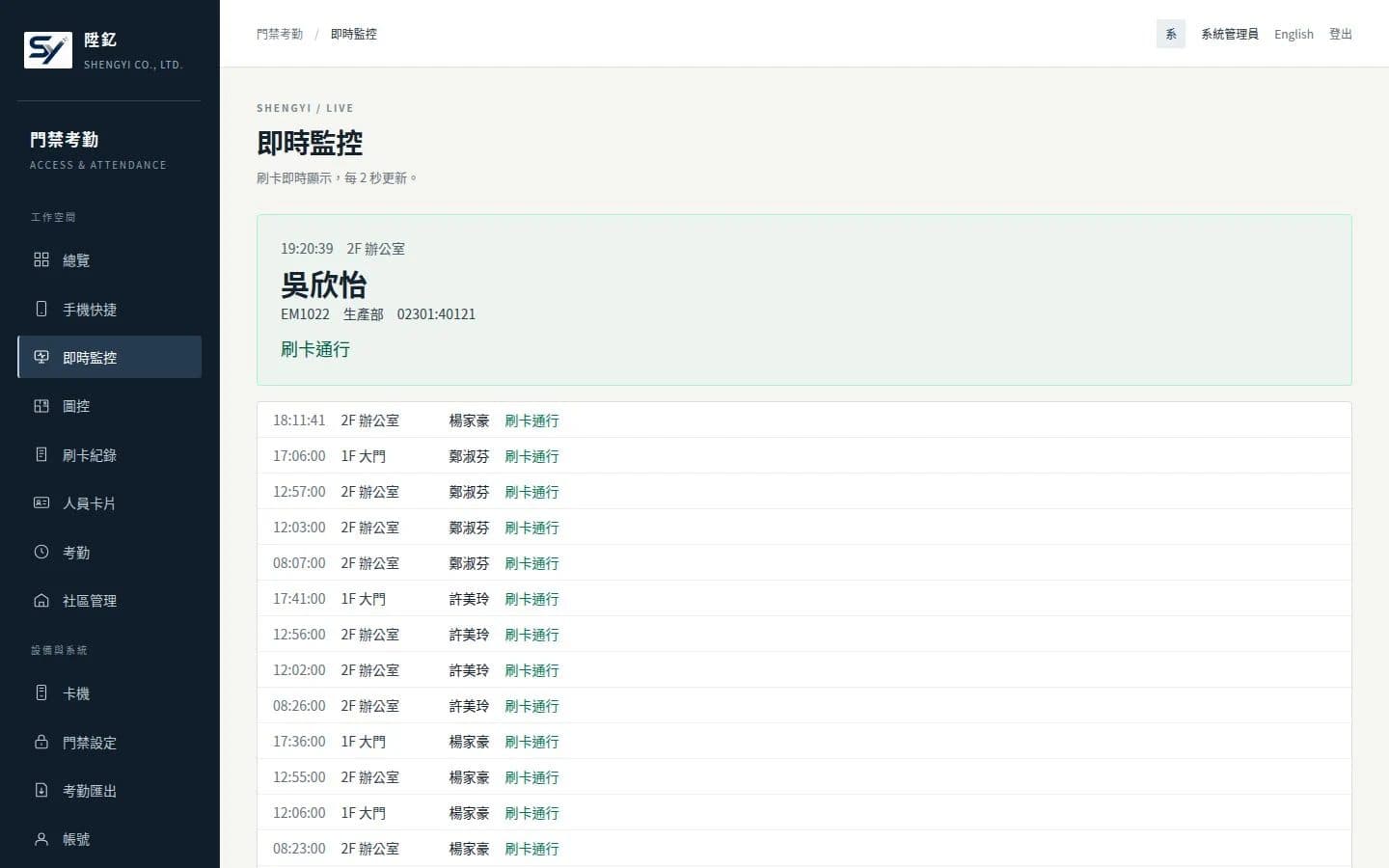
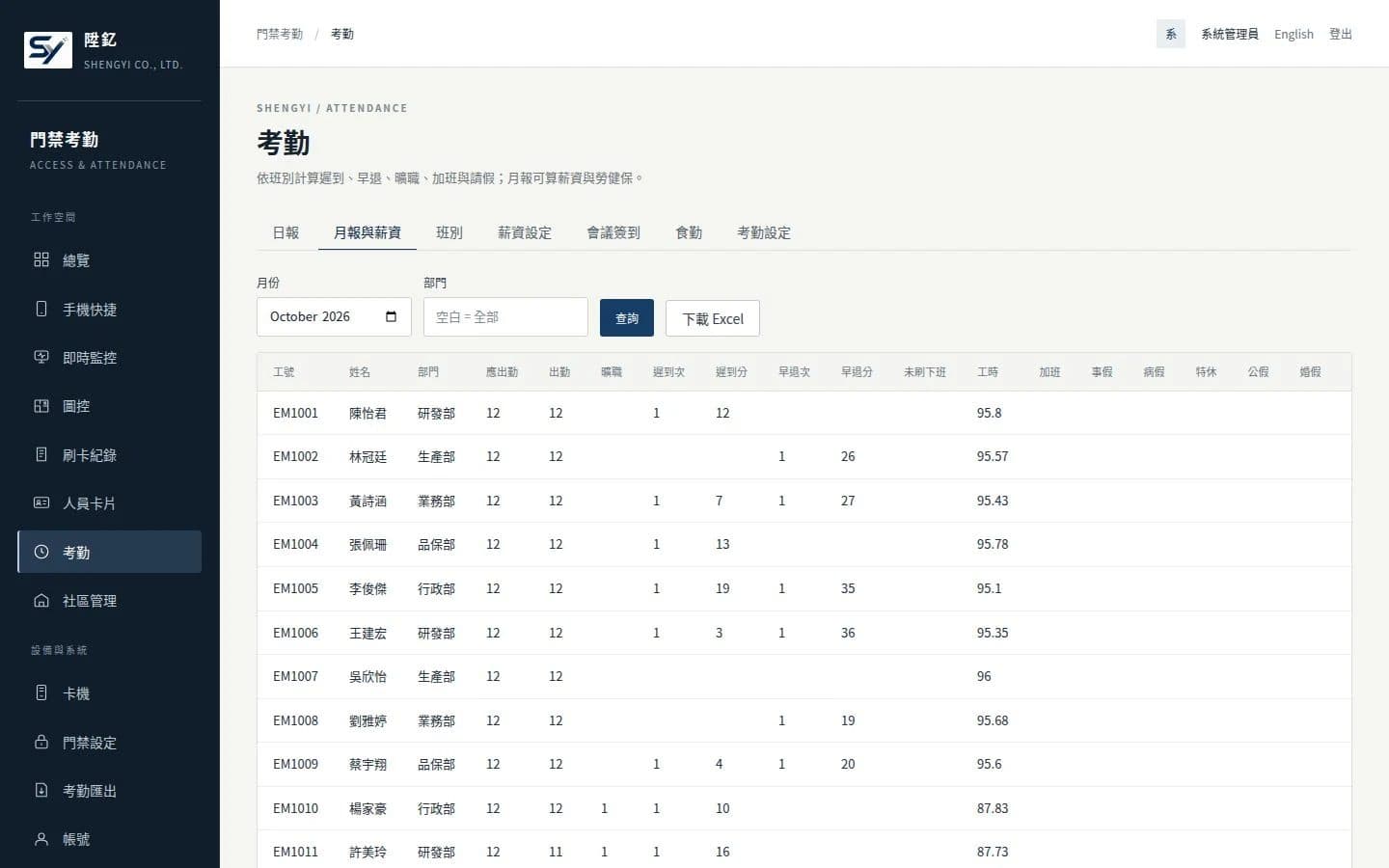
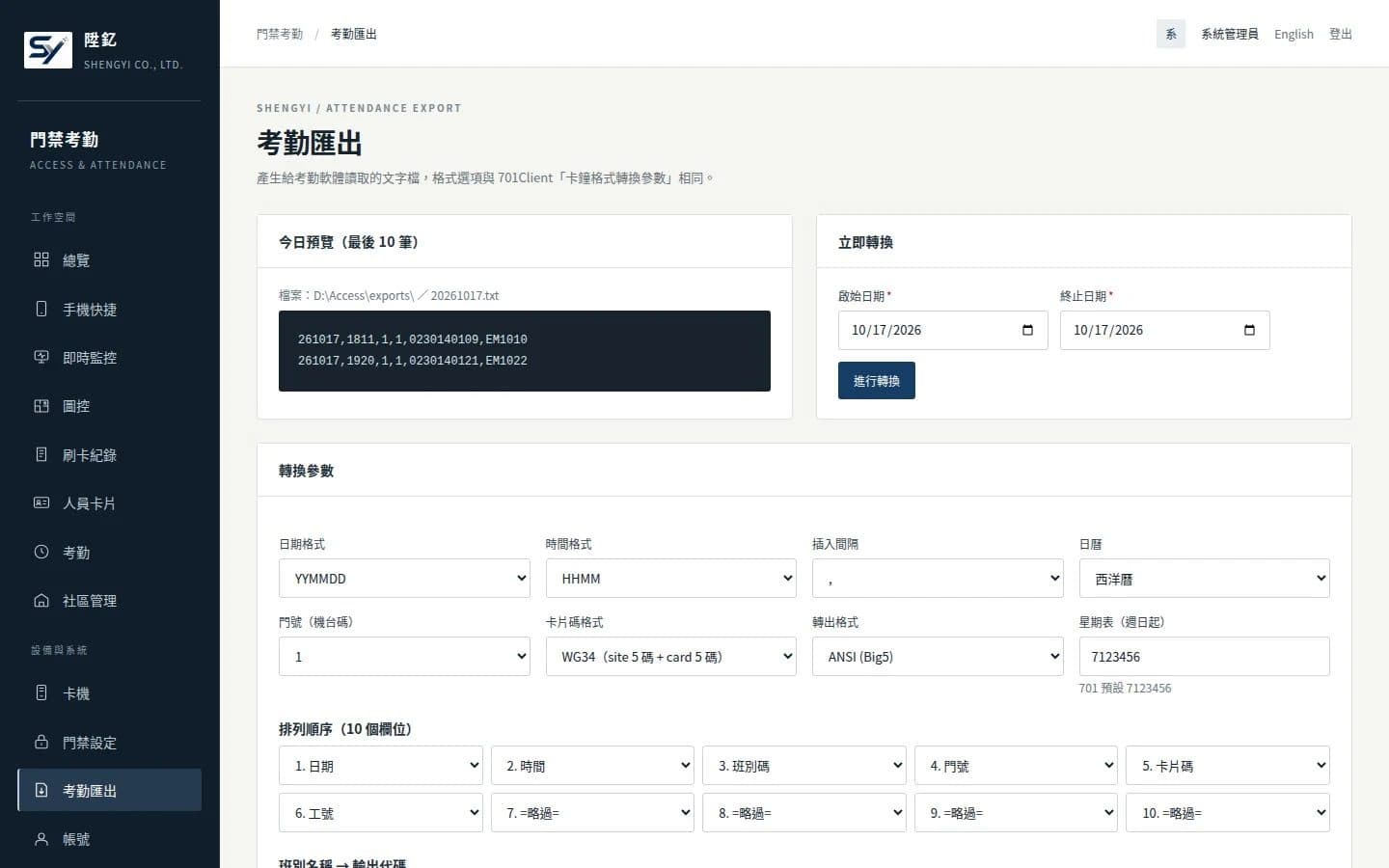
- Talks to access readers directly
A background service polls readers over TCP, keeps their clocks in sync and reconnects on its own; changes to people, cards and access rules download to the readers automatically.
- Stored before it is cleared
A swipe is committed to the database before the reader is told to delete it; if power drops mid-way, the log is still on the reader.
- Keeps your attendance software
Export files follow 701Client’s conversion settings and can be written in real time, on a schedule, or continuously.
- Managed from a browser
Nothing to install on each PC, usable from a phone browser, switchable between Chinese and English.
- Data stays in-house
One Windows machine, two services, a single-file database, and daily backups without downtime.
Access control and attendance are the core; community management is for residential buildings. Everything below can be tried on the online demo.
- Access controlWhat it covers64 time zones, a 120-day holiday table, door groups, visitor and expiring cards, enrol-by-swipe, anti-passback, card replacement and blacklist, elevator floorsNotesEvery write is read back and compared byte by byte; time zones and door groups in use cannot be deleted, so access never widens silently.
- Monitoring and remote controlWhat it coversRemote open/close, door and lock status, reader parameters, unlocked schedules, live monitor, alertsNotesFire, duress, blacklisted cards, offline readers and doors held open can notify by email, LINE or webhook; off by default.
- Attendance and payrollWhat it coversShifts (flexible, overnight, make-up days), daily and monthly reports, leave and corrections, pay and insurance contributions, ExcelNotesDaily-report rules follow the 701 manual; its worked examples are automated tests.
- Attendance exportWhat it coversDate/time format, field order, card format (WG34 / ABA10), Big5 encoding; real-time, scheduled or continuousNotesOptions map one-to-one to 701Client’s time-clock conversion settings.
- CommunityWhat it coversResident tree, security log and handover, patrols, notice board, parcels, facility booking and points, fees, lockersNotesShares the same resident and card records as access control.
- Accounts and systemWhat it coversThree-tier accounts with scoped access, login lockout, audit log, backup and restore, Chinese / EnglishNotesFive failures in 15 minutes from one account or IP locks it for 15 minutes; backups run daily without downtime.
| Module | What it covers | Notes |
|---|---|---|
| Access control | 64 time zones, a 120-day holiday table, door groups, visitor and expiring cards, enrol-by-swipe, anti-passback, card replacement and blacklist, elevator floors | Every write is read back and compared byte by byte; time zones and door groups in use cannot be deleted, so access never widens silently. |
| Monitoring and remote control | Remote open/close, door and lock status, reader parameters, unlocked schedules, live monitor, alerts | Fire, duress, blacklisted cards, offline readers and doors held open can notify by email, LINE or webhook; off by default. |
| Attendance and payroll | Shifts (flexible, overnight, make-up days), daily and monthly reports, leave and corrections, pay and insurance contributions, Excel | Daily-report rules follow the 701 manual; its worked examples are automated tests. |
| Attendance export | Date/time format, field order, card format (WG34 / ABA10), Big5 encoding; real-time, scheduled or continuous | Options map one-to-one to 701Client’s time-clock conversion settings. |
| Community | Resident tree, security log and handover, patrols, notice board, parcels, facility booking and points, fees, lockers | Shares the same resident and card records as access control. |
| Accounts and system | Three-tier accounts with scoped access, login lockout, audit log, backup and restore, Chinese / English | Five failures in 15 minutes from one account or IP locks it for 15 minutes; backups run daily without downtime. |
- 01Import people and cards
Export people and cards from 701Client, convert to CSV (Big5 or UTF-8) and import, keeping the existing user addresses.
- 02Set up the attendance export
Match 701Client’s time-clock conversion settings one by one and point the export folder at wherever the attendance software reads from.
- 03Stop 701Server
Shut it down along with its Windows service, so each reader is polled by exactly one system.
If both systems poll the same reader, each reads and deletes swipe logs, and the records end up split between them.
- 04Add readers one by one
Enter each reader’s IP and node number; once added, the system downloads the full card list to it. Readers can be moved over one at a time.
- 05Swipe-test and compare
Test access and restrictions, then compare the export preview, the old file format and what the attendance software actually reads before cutting over.
- Do we need new readers or new cards?
- Readers confirmed as compatible stay as they are — no new hardware, no reissued cards. People and cards are exported from 701Client and imported as CSV with the existing user addresses. For other brands or models, tell us first and we will check the protocol.
- Can it run alongside 701SQL for a while?
- Not on the same reader — both would read and delete the swipe logs, splitting the records. You can migrate reader by reader: stop 701Server polling that one, then add it to SynAccess.
- Where does the data live? Is it a cloud subscription?
- It runs on one Windows machine inside your company, with the database in a single file — no separate database server. Backups run daily online and can go to another disk or a NAS. It is a perpetual licence quoted by reader count, headcount and modules; the first year includes maintenance, and from the second year an annual maintenance contract covers security updates and fixes.
- What happens to swipes if the network or power drops?
- A swipe is written to the database before the reader is told to delete it; while disconnected, logs stay on the reader and are collected on reconnect. A stress test with 20 simulated readers and 1,000 people lost and duplicated nothing — a simulated result, so reader capacity and power still need checking on site.
synaccess.shengyiltd.com
SynAccess has its own site (in Chinese): every feature by module, twelve real screens, the 701 export options side by side, installation requirements and the questions people ask before switching. There is also an online demo wired to simulated readers.
- Company
- SHENGYI CO., LTD. 陞釔有限公司
- Tax ID
- 62222816
- Address
- 7F., No. 3, Ln. 70, Anmin St., Xindian Dist., New Taipei City, Taiwan
- Phone
- 02-8666-3131
- contact@shengyiltd.com
- Service hours
- Monday to Friday, 09:00–18:00
https://shengyiltd.com