
ERP system. Inventory, orders, purchasing and accounting all hang off one stock figure.
- 01WHO IT IS FOR
- 02SYSTEM ARCHITECTURE
- 03PRODUCT SCREENS
- 04CORE FEATURES
- 05MODULES
- 06HOW IT GETS IMPLEMENTED
- 07FAQ
- 08Contact
SynERP — Enterprise Resource Planning
ERP Platform · On-premise · B2B
SynERP has its own product site with screens, modules and rollout details.
Visit synerp.shengyiltd.comEverything on this page — who it fits, architecture, modules, rollout and FAQ — as one PDF, with our contact details.
ERP for SMBs, sold under a perpetual licence and installed on your own server. Inventory, orders, accounting, and omnichannel sales — all unified to digitize daily operations.
- SMBs still running inventory in spreadsheets
Stock figures live across several files, which one is current is decided by the filename, and month-end consolidation eats days of somebody’s time. The hard part of moving off that is rarely the software — it is unifying columns that were each written differently.
- Channel businesses selling through several routes at once
- E-commerce
- Retail
- Wholesale
E-commerce, retail and wholesale each keep their own books, so the same item carries three different numbers. The system holds one authoritative stock and ledger, then pushes the figures back out to each channel and report.
- Buyers under constant assortment pressure
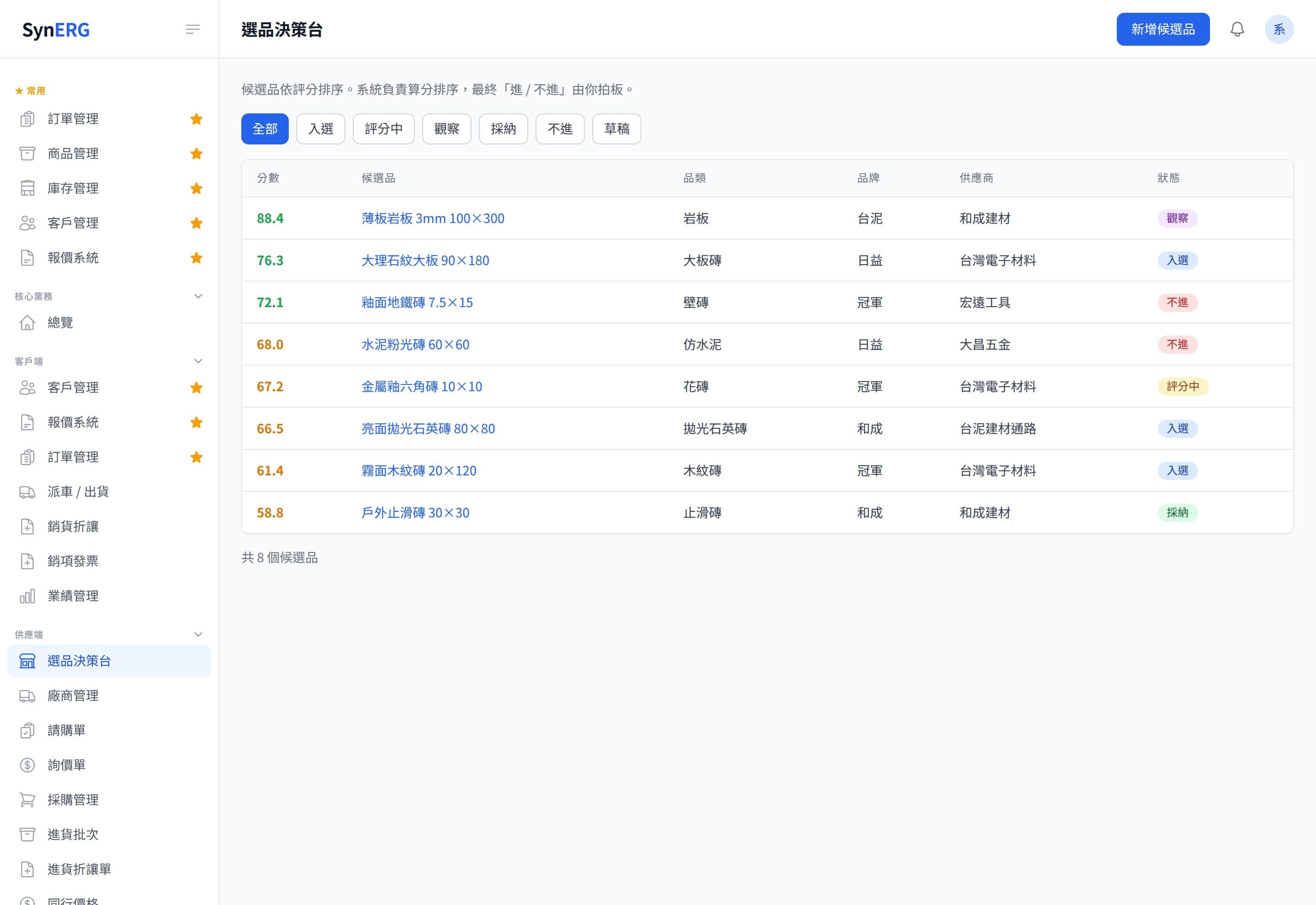
Purchasing decisions get made on impressions and whatever sales says, so the slow movers sit in the warehouse while the fast ones run out. The product-selection module turns that into numbers you can argue about, drawn from actual sales and stock.
- Companies whose existing system only does the books
The incumbent system handles accounting and tax filing while shipping, stock and purchasing stay manual. Modules roll out in stages: start with products and inventory and leave the accounting side as it is, rather than replacing everything at once.
Manufacturing that needs work orders, BOMs and production scheduling sits outside what these modules were designed for — they are built for trading and channel businesses. We assess that kind of requirement up front and say plainly if it does not fit.
Orders, receiving and quotes flow in from wherever they happen; the system keeps one authoritative stock and ledger, then pushes numbers back out to the storefront, the tax platform and the reports people actually read.
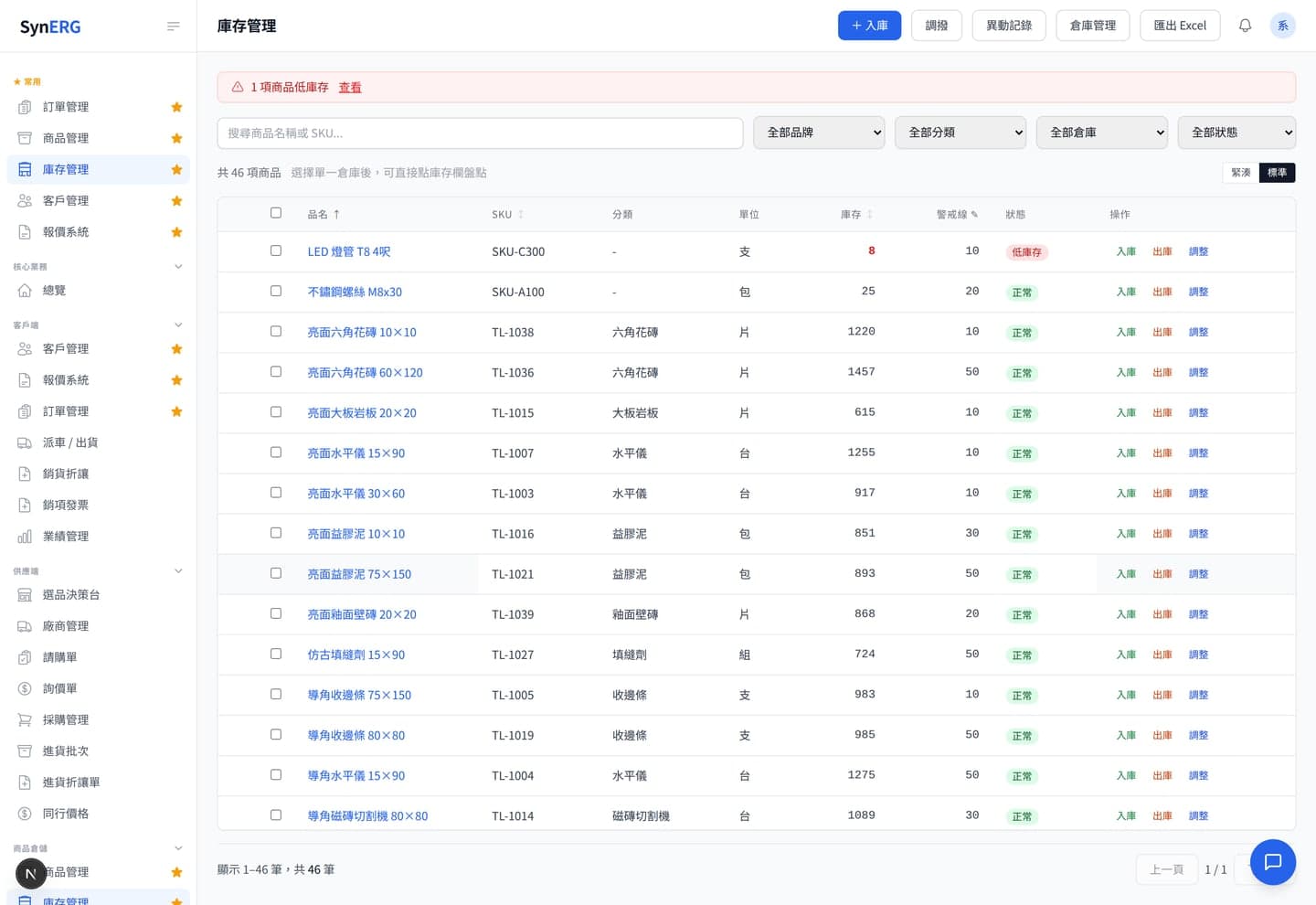
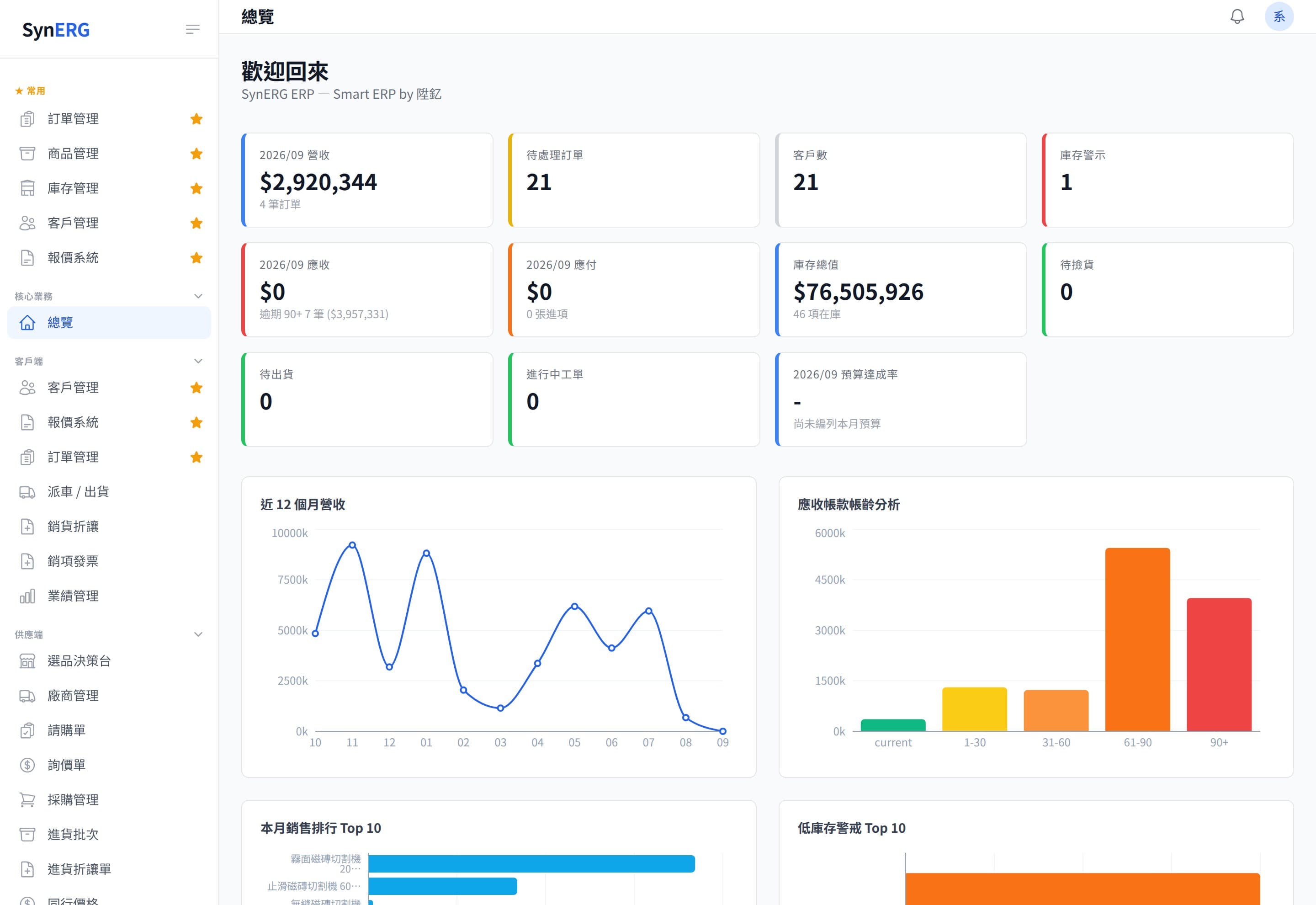
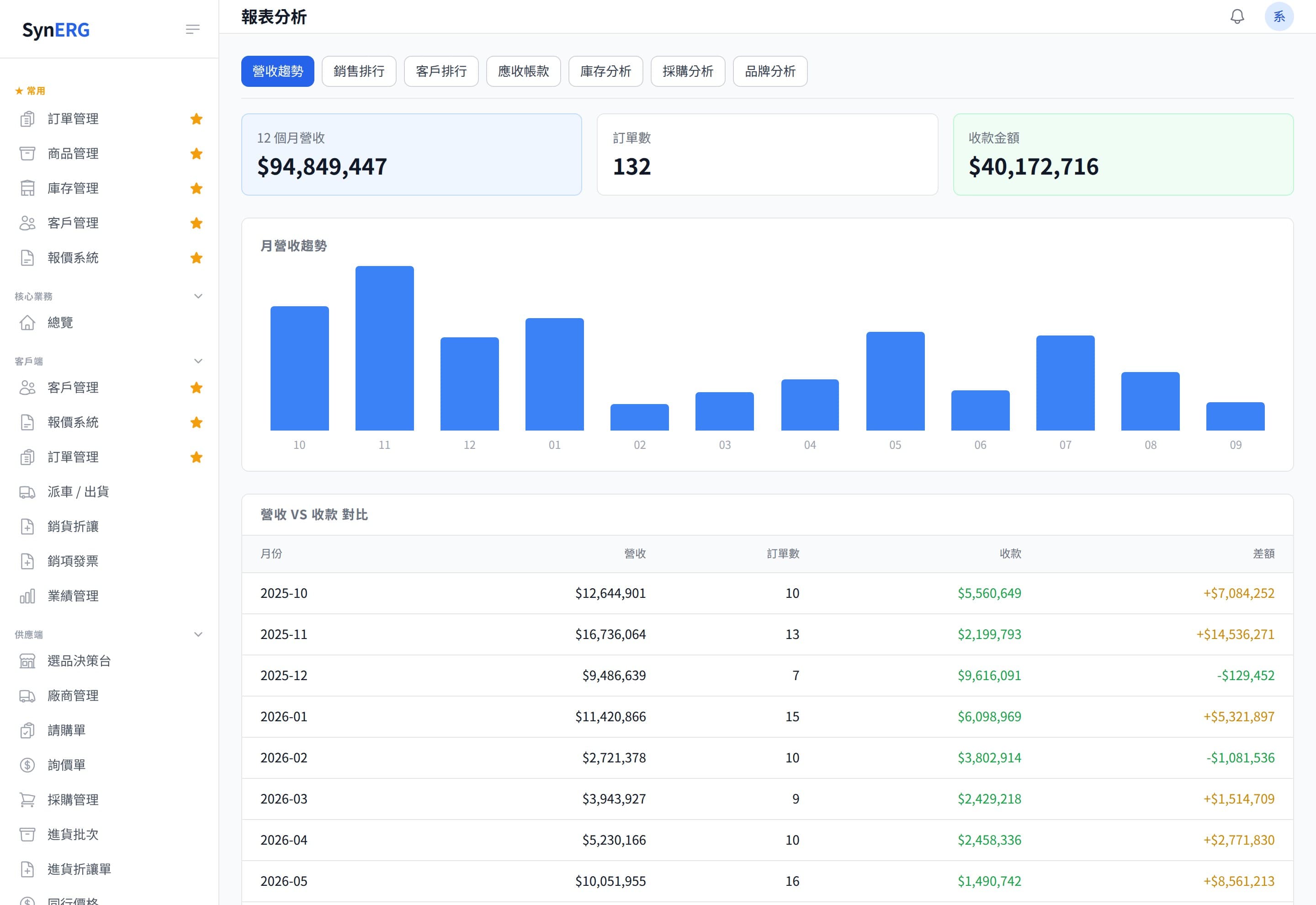
- Inventory
Multi-warehouse, batch/serial tracking, safety stock, automatic replenishment.
- Orders
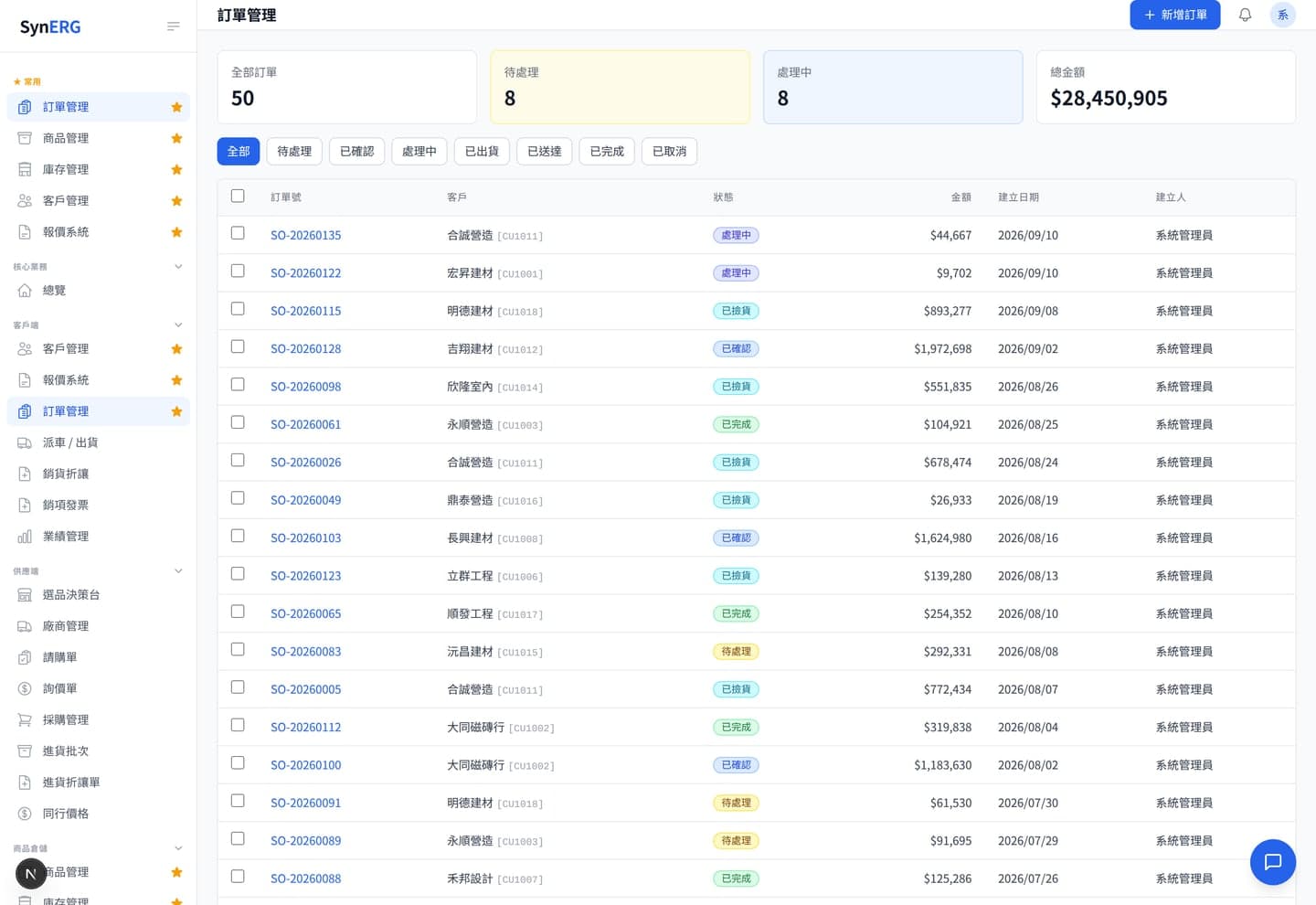
Sales / purchase / returns flows with multi-payment and shipping integrations.
- Accounting
Taiwan accounting standards: e-invoice, input/output VAT, P&L, tax filing summaries.
- Omnichannel
Sync e-commerce platforms, POS, and physical stores into a single consolidated view.
- Open API
External system integration via REST API — avoid double data entry.
Modules can be rolled out in stages rather than all at once. Most customers start with products and inventory, then extend into purchasing or accounting as the pain dictates.
- Products and inventoryWhat it coversProduct master, categories and tags, multi-warehouse stock, stocktakes, assembliesNotesInventory is the spine of the system; the other modules hang off it.
- Orders and shippingWhat it coversSales orders, picking, dispatch, credit notes, returnsNotesTakes e-commerce orders as well as manual entry.
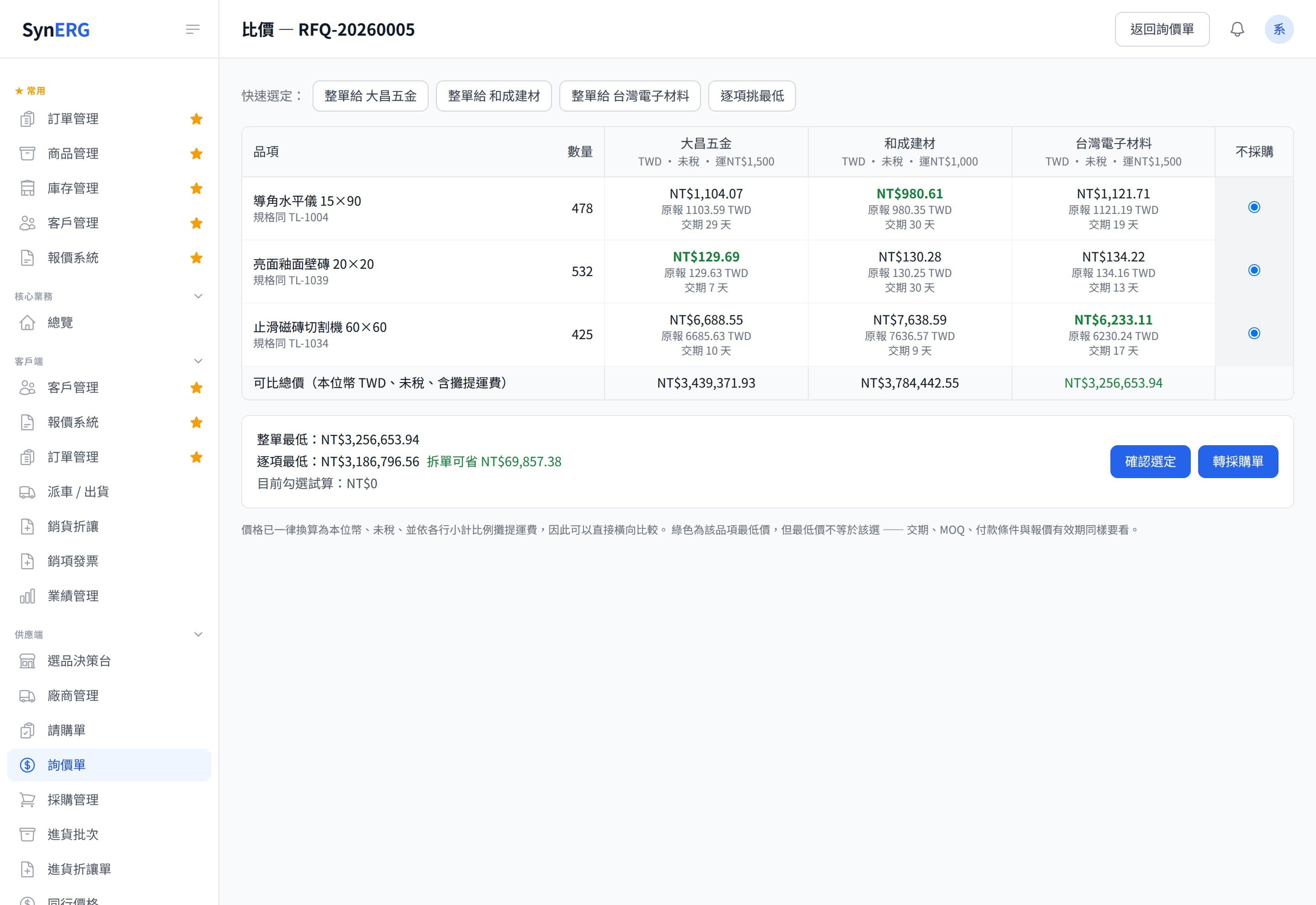
- Purchasing and RFQWhat it coversRequisitions, RFQs, purchase orders, receiving batches, competitor price comparisonNotesThe RFQ module launched in August 2026, bringing quote requests and responses into the system.
- Accounting and invoicingWhat it coversReceivables and payables, output and input tax, e-invoicesNotesDesigned around Taiwanese accounting and tax practice.
- Product selectionWhat it coversUses sales and stock data to support what-to-buy and how-much decisionsNotesAimed at channel businesses under constant assortment pressure.
| Module | What it covers | Notes |
|---|---|---|
| Products and inventory | Product master, categories and tags, multi-warehouse stock, stocktakes, assemblies | Inventory is the spine of the system; the other modules hang off it. |
| Orders and shipping | Sales orders, picking, dispatch, credit notes, returns | Takes e-commerce orders as well as manual entry. |
| Purchasing and RFQ | Requisitions, RFQs, purchase orders, receiving batches, competitor price comparison | The RFQ module launched in August 2026, bringing quote requests and responses into the system. |
| Accounting and invoicing | Receivables and payables, output and input tax, e-invoices | Designed around Taiwanese accounting and tax practice. |
| Product selection | Uses sales and stock data to support what-to-buy and how-much decisions | Aimed at channel businesses under constant assortment pressure. |
- 01Map the current process
Understand how receiving, shipping and reconciliation actually run today — including the rules that live in spreadsheets or in one person’s head.
- 02Import the master data
Import products, customers, suppliers and opening stock, resolving data inconsistencies in one pass.
If opening stock is wrong, every report afterwards is wrong.
- 03Configure flow and permissions
Set up warehouses, document flows, and what each role can see and change.
- 04Run in parallel
Run the old and new ways side by side for a while, compare stock and accounting figures, and only switch once they agree.
- 05Cut over and operate
The system becomes the source of truth; Shengyi handles updates and incidents from there.
- Do we need OMGO to use it?
- No. SynERP can be deployed on its own purely for inventory and accounting. If you also run OMGO, stock and orders are connected directly so the store and the website share one pool. With other platforms it depends on the interface they expose.
- We track stock in Excel — can that be migrated?
- Yes, it imports. The real work is unifying the different ways the same item is written across spreadsheets, and verifying the actual opening stock — get that wrong and every later report is wrong.
- How are permissions handled with multiple users?
- Visibility and document actions are set per role, with what can be seen controlled separately from what can be changed.
- How long does implementation take?
- It depends on catalogue size and process complexity. Straight inventory work moves fastest; cases involving accounting, invoicing or integration with an existing system need a longer parallel-run period. We give a real timeline after the initial survey.
- How is it priced?
- A perpetual licence paid once, not a monthly subscription, quoted by the modules you adopt and the scale. The first year includes maintenance; from the second year an annual maintenance contract covers security updates, fixes, and changes to e-invoice and tax rules (new features and new modules are quoted separately).
synerp.shengyiltd.com
SynERP has its own site: the five modules and what each covers, the real screens, the ledger entries a single shipment actually moves, the five implementation steps, and the three questions worth asking before you commit.
Visit synerp.shengyiltd.com →- Company
- SHENGYI CO., LTD. 陞釔有限公司
- Tax ID
- 62222816
- Address
- 7F., No. 3, Ln. 70, Anmin St., Xindian Dist., New Taipei City, Taiwan
- Phone
- 02-8666-3131
- contact@shengyiltd.com
- Service hours
- Monday to Friday, 09:00–18:00
https://shengyiltd.com
Before comparing products, it often helps to settle the question underneath. These are written from projects we actually delivered.
- Choosing a system7 min read
Inventory system vs ERP: which should an SMB start with?
Three quotes, an order of magnitude apart, for one problem. An inventory system manages goods; an ERP manages the consistency between goods, money and books.
- Evaluation6 min read
When should an SMB adopt an ERP? Six signs you have outgrown spreadsheets
Spreadsheets last longer than people expect. The question is not whether they are bad, but when they turn from an asset into a risk.
- Evaluation8 min read
What data to prepare before an ERP rollout: a checklist you can work through
Going live on uncleaned data ranks second among rollout failures, and the effort is underestimated three to five times. Six items, in order.
- Evaluation7 min read
Five common reasons ERP rollouts fail
Post-mortems seldom point at the software. They point at process, expectations and data — and the warning signs are visible before anyone signs.
- Inventory8 min read
Designing multi-warehouse stock and transfers as you grow past one location
With one location, stock is a single number. Add a second and sellable quantity, in-transit ownership and cost movement all need deciding.