
Property management. Parcels, visitors, facility booking, fee statements, repairs, duty logs and maintenance, sharing resident records with access control.
- 01WHO IT IS FOR
- 02SYSTEM ARCHITECTURE
- 03PRODUCT SCREENS
- 04CORE FEATURES
- 05SPECIFICATIONS
- 06FAQ
- 07Contact
SynOne Property — Property Management
Residents · Parcels · Facilities · Fees · On-premise
SynOne Property has its own product site with screens, modules and rollout details.
Visit synone.shengyiltd.comEverything on this page — who it fits, architecture, modules and FAQ — as one PDF, with our contact details.
Everything the management office does every day — parcels, visitors, facility bookings, fee statements, repair requests, shift handovers — in one system that shares its resident and unit records with access control. It fits both residential communities and office buildings, and tabs you do not need can be hidden.
- Committees and property firms in residential communities
- Residential
One record for units, owners, floor area and parking spaces; management fees bill by fixed amount or area, with arrears lists and reminders generated in one step; polls support one vote per unit or area weighting.
- Office buildings with several tenants per floor
Floor leasing handles several tenants per floor with expiry reminders; the lobby kiosk’s directory reads the tenant records directly and shows vacant floors as available.
- Buildings preparing intelligent-building evidence
Annual maintenance plans, inspection sheets that judge pass or fail, asset cards and register changes, contract and warranty reminders, a document library, plus certification statistics and an evidence-pack tool.
Management fees, facility charges and deposits are recorded and payments logged in the system; there is no online payment or convenience-store collection at present. Meter readings per unit are entered by hand, and the system calculates usage and flags anomalies.
Property runs as its own service and shares residents and units with access control; a facility booking can open the matching door for the booked slot, and an emergency SOS appears on every screen of the platform at once.
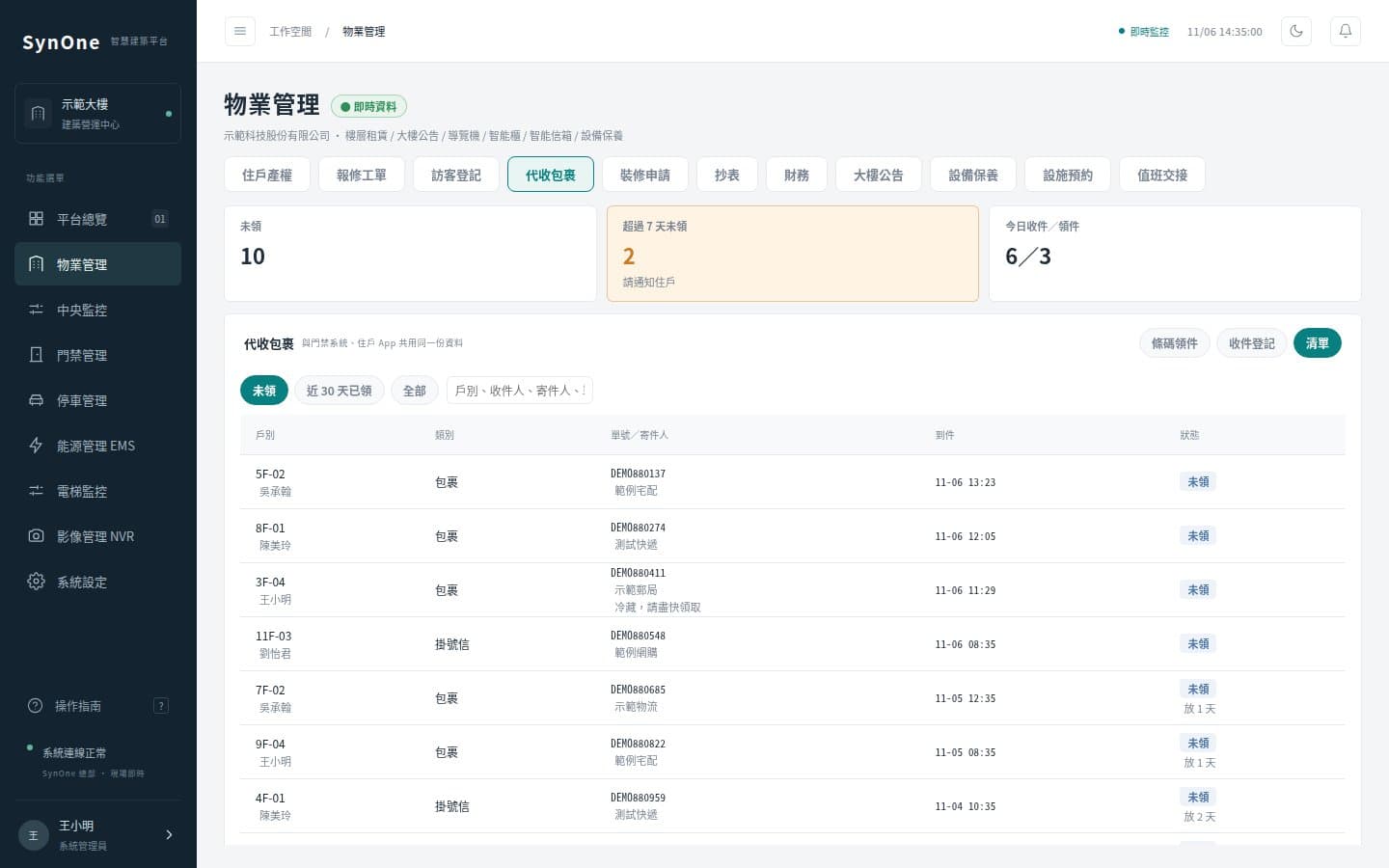
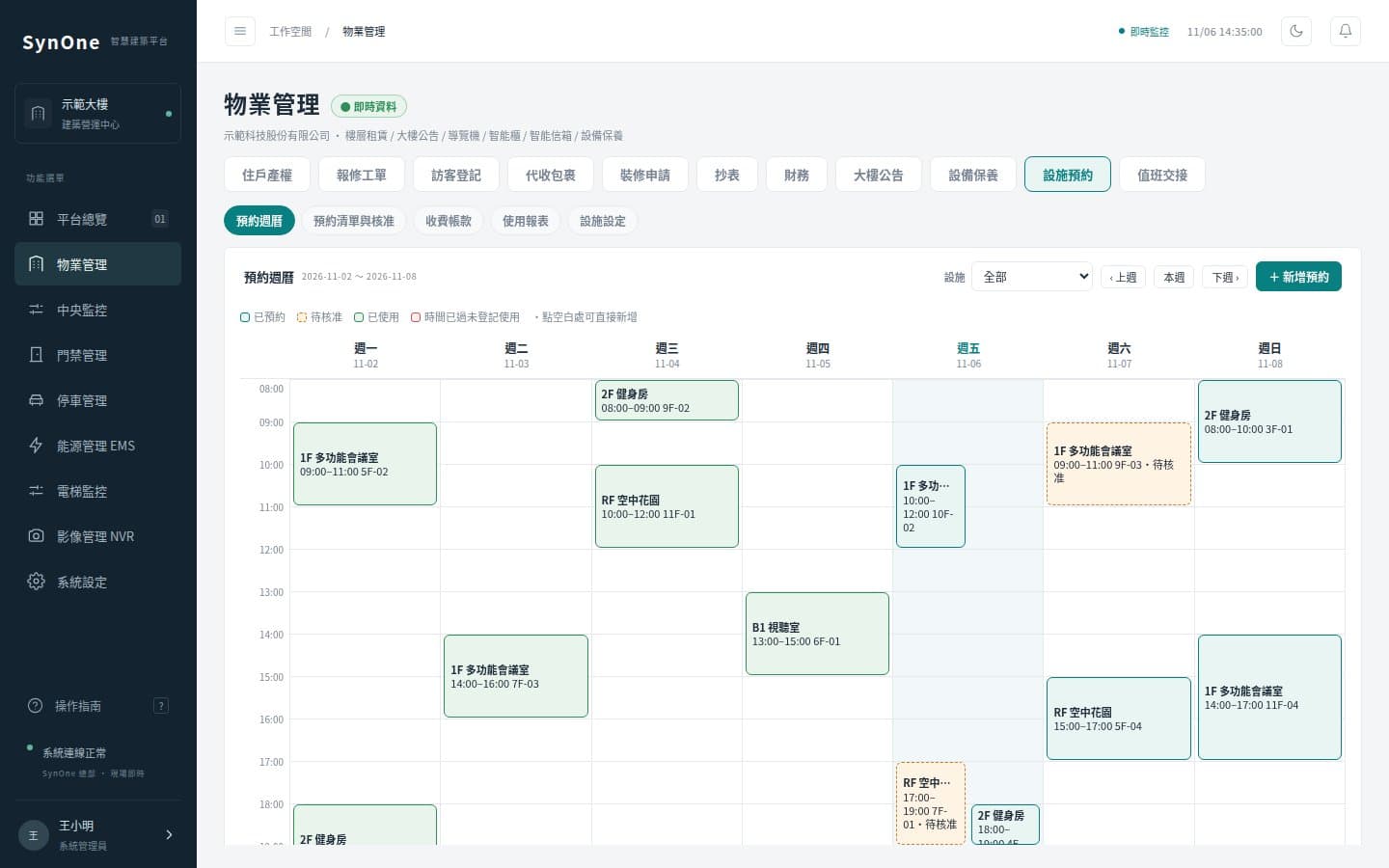
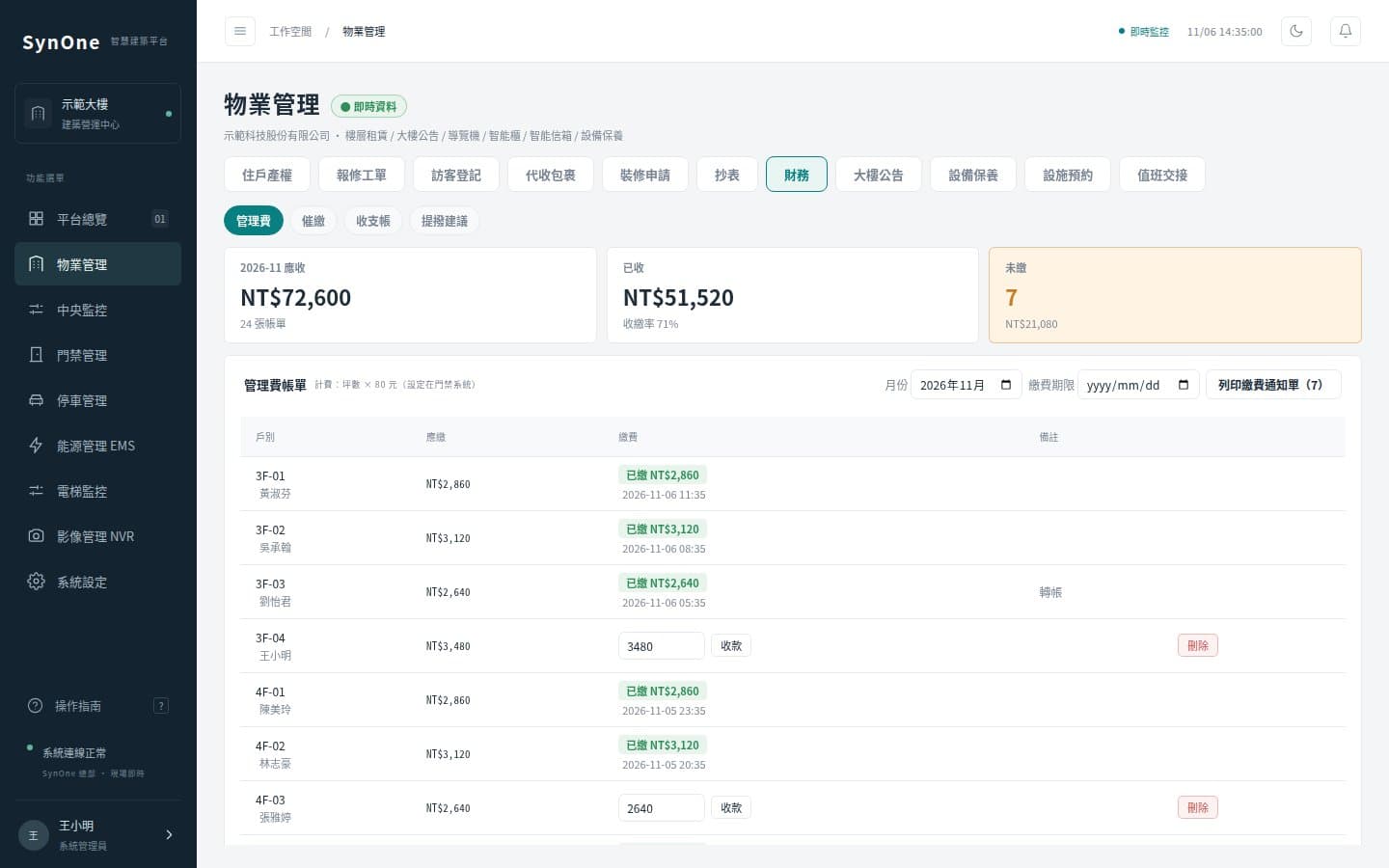
- Parcels by barcode
Parcels and mail are logged by scanning the barcode, collected in batches, and overdue items are tallied; left items get a pickup code and holding period.
- Bookings tied to the doors
Requests, approvals, usage, clash checks, fees, deposits and points; the facility door can be opened for the booked slot only, closing again outside it.
- SOS across the platform
Panic buttons and duress codes trigger it; a red banner and siren appear across the platform, the location is marked on the 3D building and floor plans, the nearest video opens, and acknowledgement, handling and closure are recorded — with drills supported.
- Shift handovers that stick
Duty logs, signed handovers, patrol records (using access readers as checkpoints), incident reports and drills all live in one place.
Property can be bought on its own or combined with access control and parking; unused tabs can be hidden in settings.
- Residents and leasesWhat it coversUnits, owners, area and parking (Excel import); office floor leases with several tenants per floor and expiry remindersNotesShares resident and card records with access control.
- Daily servicesWhat it coversNotices (categories, attachments, scheduling), parcels and mail, left items, visitor log, repair tickets, renovation permits and depositsNotesNotices also appear on the lobby kiosk.
- Facilities and accountsWhat it coversFacility booking and points, fee statements (fixed or by area), payment logging, arrears and reminders, ledger and reserve-fund reportsNotesRecords and payment logging only; no online payment.
- Committee businessWhat it coversPolls (one vote per unit, area weighting, secret ballot), document library with expiry reminders, handover inventory, committee roster, vendor tenders, item loans, motorcycle-space lotteryNotesLottery results can be recomputed to verify them.
- Security and safetyWhat it coversDuty log, signed handovers, patrols, move-out checks against arrears, violations, emergency contacts, incident reports and drills, emergency SOSNotesSOS is enabled after on-site testing.
- Maintenance and assetsWhat it coversAnnual plans, inspection sheets with pass/fail, asset cards, register changes, photos, contract and warranty reminders, long-term repair planning, certification statisticsNotesMaintenance templates import as a whole.
| Module | What it covers | Notes |
|---|---|---|
| Residents and leases | Units, owners, area and parking (Excel import); office floor leases with several tenants per floor and expiry reminders | Shares resident and card records with access control. |
| Daily services | Notices (categories, attachments, scheduling), parcels and mail, left items, visitor log, repair tickets, renovation permits and deposits | Notices also appear on the lobby kiosk. |
| Facilities and accounts | Facility booking and points, fee statements (fixed or by area), payment logging, arrears and reminders, ledger and reserve-fund reports | Records and payment logging only; no online payment. |
| Committee business | Polls (one vote per unit, area weighting, secret ballot), document library with expiry reminders, handover inventory, committee roster, vendor tenders, item loans, motorcycle-space lottery | Lottery results can be recomputed to verify them. |
| Security and safety | Duty log, signed handovers, patrols, move-out checks against arrears, violations, emergency contacts, incident reports and drills, emergency SOS | SOS is enabled after on-site testing. |
| Maintenance and assets | Annual plans, inspection sheets with pass/fail, asset cards, register changes, photos, contract and warranty reminders, long-term repair planning, certification statistics | Maintenance templates import as a whole. |
- Does it suit both residential and office buildings?
- Yes. Residential sites use unit and owner records; office buildings use floor leasing with several tenants per floor. Tabs you do not need can be hidden, leaving only what the office actually uses.
- Can residents pay fees online?
- Not at present. The system issues statements, logs payments, lists arrears and produces reminders; collection still goes through the office or your existing channels.
- Do we re-enter resident data?
- No. Residents and units import from Excel, and with SynOne Access the access and property modules share one set of resident and card records, entered once.
- How are visitors handled?
- Visitors can be pre-registered or logged on arrival, checked in and out, with only the last four characters of an ID stored; records export to CSV, and any temporary card number is logged with them.
Each product can be bought on its own; on one SynOne platform they share accounts, alarms and the same people, door and device records.
Licensing
Sold under a perpetual licence for one site and one server, bound to that server’s hardware by a digitally signed licence file. Copying it to other machines or sites, reselling or lending it, reverse engineering it or circumventing the licence check is prohibited, and infringements are pursued under the Copyright Act. Full licence terms (Chinese) →
- Company
- SHENGYI CO., LTD. 陞釔有限公司
- Tax ID
- 62222816
- Address
- 7F., No. 3, Ln. 70, Anmin St., Xindian Dist., New Taipei City, Taiwan
- Phone
- 02-8666-3131
- contact@shengyiltd.com
- Service hours
- Monday to Friday, 09:00–18:00
https://shengyiltd.com